

Description
Download Easy Currency Converter – currency converter, exchange rate, money conversion, international money, travel money, convert currency, global money, money tool, currency utility, exchange tool
Overview
Easy Currency Converter is a dedicated utility designed to simplify international monetary conversions for users navigating global financial transactions. With support for nearly 200 currencies worldwide, including both widely used and less common denominations such as the Russian Ruble and the Sandwich Islands Rupia, the tool serves as a reliable reference for individuals requiring accurate, up-to-date exchange rates. The application is particularly useful for travelers, freelancers, students, and small business owners managing cross-border payments. By anchoring all conversions to the United States Dollar (USD), it provides a consistent benchmark, reducing complexity and enhancing clarity when comparing values across regions. The developer, Easy Software, has maintained a lightweight, focused design since its initial release in 2012, reflecting a commitment to usability and efficiency. Although the developer did not provide additional technical details, the app’s longevity suggests a stable and functional core. Real-world use cases include planning international trips, managing foreign income, or comparing prices across markets. In the broader productivity ecosystem, Easy Currency Converter fills a niche for fast, no-frills currency conversion without requiring internet access for basic functionality, making it a dependable tool for users seeking simplicity and reliability.
Key Features & Functionality
- Wide Currency Coverage: Supports nearly 200 currencies globally, including rare and regional denominations, ensuring users can convert even obscure monetary units with confidence.
- USD-Based Conversion System: All exchange calculations are anchored to the United States Dollar, providing a standardized reference point that simplifies cross-currency comparisons.
- One-Tap Update Functionality: Users can refresh currency data instantly with a single button press, ensuring access to the most current exchange rates without manual input.
- Taskbar Integration: The application can be minimized to the system taskbar, allowing quick access without occupying primary screen space.
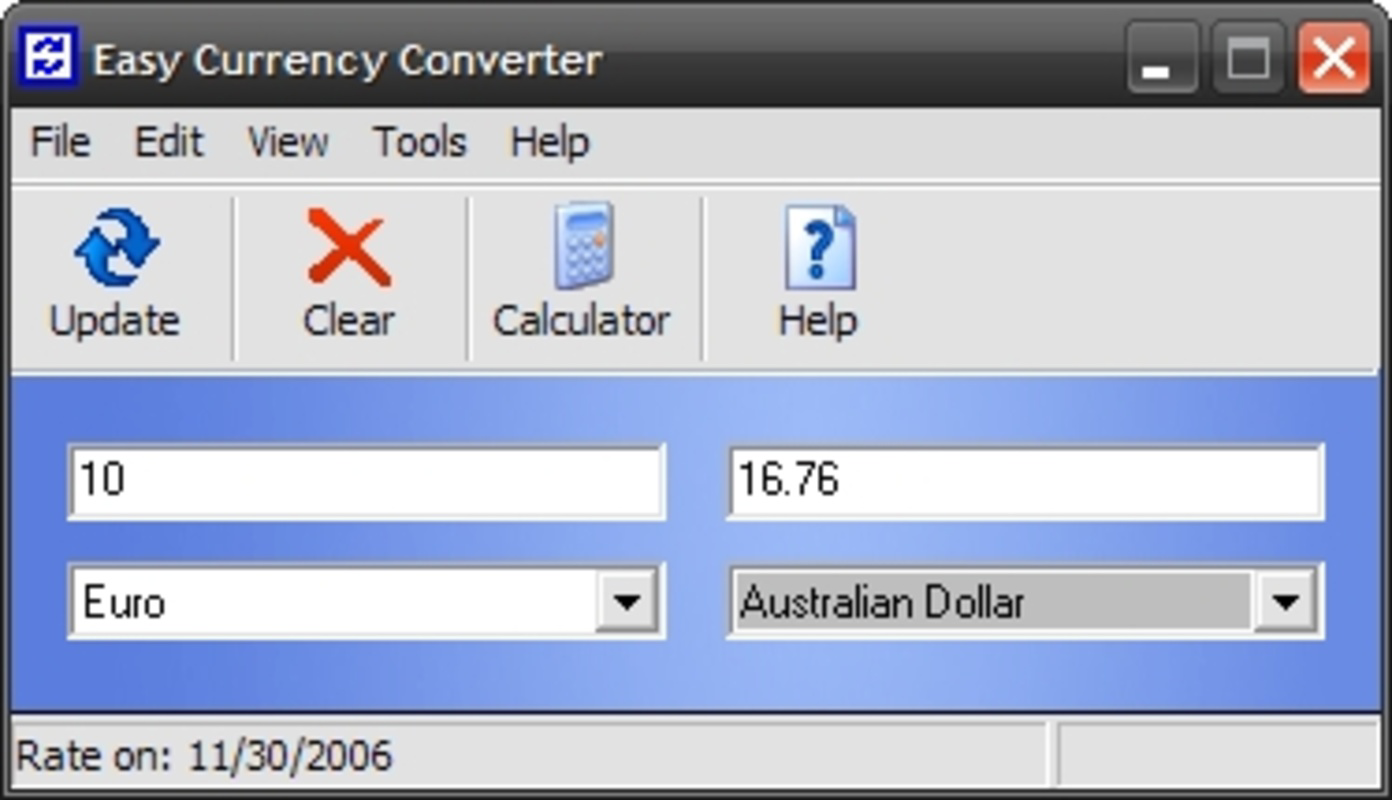
- Last Update Timestamp Display: The status bar shows the exact date of the last data refresh, promoting transparency and helping users assess the validity of current rates.
For example, a traveler preparing for a trip to Southeast Asia can quickly convert USD to the local currency using the app’s interface. A freelancer receiving payments in multiple currencies can use the tool to evaluate earnings in a common unit. The one-tap update ensures that the data remains current, especially important during periods of market volatility. The taskbar feature allows users to keep the app running in the background while working on other tasks, enhancing workflow efficiency. Although the developer did not specify data sources or update frequency, the inclusion of a last update timestamp indicates a deliberate effort toward transparency. These features collectively support a seamless, low-effort experience for users who prioritize accuracy and convenience in daily financial decisions.
Interface, UX & Performance
Easy Currency Converter features a clean, minimalist interface optimized for speed and clarity. The layout centers around a straightforward input field for the amount and dropdown menus for selecting source and target currencies, minimizing cognitive load. Navigation is intuitive, relying on standard Windows interaction patterns, which makes it accessible to users of all technical levels. The visual style is functional rather than decorative, focusing on readability and quick data retrieval. Although the developer did not list formal performance metrics, the application’s small file size of 2.5 MB suggests efficient resource usage. It is expected to run smoothly on a wide range of Windows systems, including older hardware, due to its lightweight design. Responsiveness is likely consistent across device categories, though specific benchmarks were not provided. Stability appears to be a strength, given the app’s long-standing presence since 2012. The ability to remain active in the taskbar without consuming significant system resources indicates optimized background operation. Users can expect minimal lag during conversion tasks and quick access to updated rates. While no performance data was shared, the app’s enduring functionality implies reliable operation under typical usage conditions.
Platform Compatibility & Technical Requirements
Easy Currency Converter is designed for the Windows platform and is compatible with various versions of the operating system. The current version is 1.2.1, with a file size of 2.5 MB, making it a lightweight download suitable for systems with limited storage. Although the developer did not specify minimum OS requirements, the app’s small footprint and long history suggest broad compatibility with modern and legacy Windows environments. No additional software dependencies were listed, indicating a standalone executable. The app does not require administrative privileges for installation or operation, enhancing accessibility. The release date of June 21, 2012, reflects its maturity and established presence in the productivity software space. While the developer did not disclose compatibility details for newer Windows versions, the application’s continued availability suggests ongoing support or at least functional stability. Users seeking to install the app should ensure their system meets general Windows requirements for running lightweight applications.
Pros and Cons
Pros
- Supports nearly 200 currencies, including rare and regional units.
- Conversion based on USD for consistent, standardized comparisons.
- One-tap update for real-time exchange rate refreshes.
- Taskbar accessibility for quick, unobtrusive use.
- Displays last update timestamp for transparency and data validity.
- Lightweight design with minimal system resource usage.
- Free to download and use with no in-app purchases.
Cons
- Developer did not provide information on update frequency or data sources.
- Compatibility with newer Windows versions was not explicitly confirmed.
- Interface is minimal and may lack advanced customization options.
- No built-in history or conversion log feature was mentioned.
- Platform is limited to Windows, excluding mobile users.
FAQ
Is Easy Currency Converter available for mobile devices?
The app is currently designed for the Windows platform. There is no official mobile version available at this time.
How often are the exchange rates updated?
The developer did not specify the update frequency. Users can refresh the data manually with a single button press.
Is the app safe to download and install?
Yes, the app is free and does not require installation of additional software. It is distributed as a standalone executable.
Can I use Easy Currency Converter offline?
Yes, the application functions without an internet connection after the initial data update, allowing for offline access to previously refreshed rates.
Does the app support custom currency pairs?
The app supports a wide range of currencies, but specific details on custom pair creation were not provided by the developer.
Final Thoughts
Easy Currency Converter remains a solid choice for users who need a fast, reliable, and no-frills tool for international money conversion. Its broad currency coverage, USD-based logic, and one-tap update system make it especially valuable for travelers, freelancers, and anyone managing cross-border finances. Despite its age and minimal interface, the app’s efficiency and low resource demand ensure it remains functional across a variety of systems. While it lacks modern features like history tracking or mobile access, its core purpose is executed with precision. For users seeking a secure, free, and straightforward currency utility on Windows, this app delivers consistent value. The transparency of the last update timestamp and the ability to run in the background further enhance its practicality. Download Easy Currency Converter now to simplify your global financial tasks with confidence.
Guides & Tutorials for Easy Currency Converter
How to install Easy Currency Converter
- Click the Preview / Download button above.
- Once redirected, accept the terms and click Install.
- Wait for the Easy Currency Converter download to finish on your device.
How to use Easy Currency Converter
This software is primarily used for its core features described above. Open the app after installation to explore its capabilities.
User Reviews for Easy Currency Converter 0
No reviews found


